
I recently joined Matt Zahab on the Crypto News Podcast. We covered all things big tech, crypto, Coinbase, and more. Check it out!

Hi, I'm Scott Shapiro.
I spent the 2010's building marketing products at Facebook and Google. I joined Coinbase in 2019 because cryptocurrency will shape the 2020's. I love pushing myself out of my comfort zone, whether technical or physical. This blog serves as a partial record of those attempts.
I left Google to join Coinbase

Last week, I started working at Coinbase in San Francisco. My new job is to lead the core consumer app product team. We are working to make cryptocurrency more useful for everyone.
7 Baby Adventures in Cryptocurrency
I’ve spent the last three weeks on parental leave. It’s been awesome getting to know our daughter Ava better. But in between the hundreds of diaper changes, bottle feeds, and 5 S’s, I managed to explore some cryptocurrency projects. Often early in the morning or late at night when mom and baby are sleeping.
Note that none of this is about price or trading, but rather application and utility of cryptocurrency. That’s so much more interesting than candlesticks and ICO’s. So let’s all focus more attention there!
Below are seven of the adventures I undertook:
1. Ava’s birth announcement on the blockchain
Beyond posting on Facebook and Instagram, I wanted a way to memorialize Ava’s birth using cryptocurrency.
Hacking Nest UK to work in San Francisco, USA
I’m addicted to the smart home, but have struggled for years to find a solution for our heater in San Francisco, USA. Nest wouldn’t work. Here’s how I resolved it.
My thermostat is old and analog. I wish I had a Nest
I live in an old house, built in the 1950’s. But I’m making it smart. The first step was Alexa, with TP-Link smart bulbs and Sonos. Then I integrated my rooftop solar system with Messenger.
Now that Winter Is Coming, it’s time to focus on heating: pre-heating the house before we get home from work, and again before we get out of bed in the morning.
My first year in Bitcoin
Bitcoin hit $3,000 earlier this week. Then it dropped by 30%. In honor of that arbitrary high watermark and even higher volatility, I wanted to share the first year of my journey into cryptocurrency.
I first discovered Bitcoin in February 2013.
On a cold winter morning in Menlo Park, a colleague was talking about blockchain this and crypto that. It didn’t make any sense. Miners and block rewards? What? But I remembered seeing a couple headlines on YCombinator’s Hacker News and figured this was something to learn about. So I went on Coinbase, which had just recently launched. I paid $21.65 for 1 bitcoin.
I’m building a bot
I recently started building a Messenger Bot. This is a series describing how I approached it and what I learned.
Why build a bot?
I had a specific problem to solve: was my rooftop solar power system working?
Wait, what does a bot have to do with power production? That sounds like a ridiculous question today. 10 years from now it won’t. Bots are going to be the future of how we interact with products and services.
Latest Articles
Crypto News Podcast
I recently joined Matt Zahab on the Crypto News Podcast. We covered all things big tech, crypto, Coinbase, and more. Check it out!
I left Google to join Coinbase
Last week, I started working at Coinbase in San Francisco. My new job is to lead the core consumer app product team. We are working to make cryptocurrency more useful for everyone.
Jekyll: From Github Pages to Netlify
I just finished migrating (unexpectedly) this Jekyll site’s hosting from Github Pages to Netlify. So far, I’m very happy with the decision for performance and functionality reasons.
Ledger Nano X Review - A Mobile Hardware Wallet!
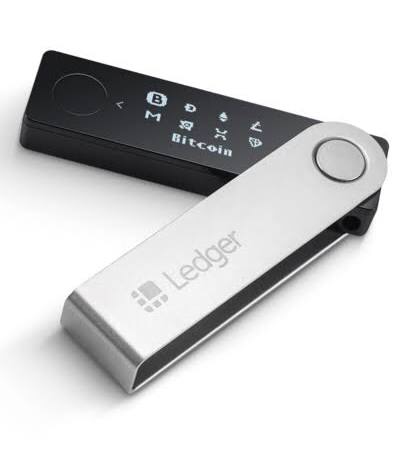
After waiting for a couple months, I finally received and unboxed my Ledger Nano X.
Jekyll serves my blog 10x faster than Wordpress
I just setup a Jekyll version of this blog, hosted on GitHub Pages. It loads 10x faster than the Wordpress version and my Pingdom score went from a D to an A. Granted it doesn’t have all the same functionality,...
Dharma Lever Alpha – borrowing and lending DAI and ETH
I shared a twitter thread on my first experience using Dharma Lever Alpha to borrow and lend Ethereum and MakerDAO’s DAI.
7 Baby Adventures in Cryptocurrency
I’ve spent the last three weeks on parental leave. It’s been awesome getting to know our daughter Ava better. But in between the hundreds of diaper changes, bottle feeds, and 5 S’s, I managed to explore some cryptocurrency projects. Often...
My Next Chapter After Facebook
In 2010, I was weighing a heavy decision. I had two compelling job offers. Do I return to the Ads Product Marketing team at Facebook, where I had interned and continued to work part time during grad school? Or do...
Never miss a Booking.com free cancellation
I love Booking.com. It’s my favorite travel reservation site.
Hacking Nest UK to work in San Francisco, USA
How I had to import and hack Nest UK to work with my ancient furnace heater in San Francisco